Before an inbound total reaches your selling decision, ask what each row counts. An ordered quantity and a shipment quantity can describe the same units at different points in their journey. Adding them creates a bigger number without establishing more supply.
Shopify announced three purchase-order reports on October 6, 2026: costs, transfers and purchases on order. That gives operators a timely reason to check how they read purchasing data. The announcement does not establish access for a particular merchant; Shopify’s help documentation makes availability conditional on the store. Announcement · Report documentation
Start with the population and the row
Shopify documents these distinctions:
| Report | Underlying grain and population | Date used for the report range |
|---|---|---|
| Purchase order costs | Purchase-order lines | PO-line-created date |
| Purchases on order | Purchase-order lines for open, ordered POs without linked transfers | PO-line-created date |
| Purchase order transfers | Shipment lines linked to POs | Shipment-created date |
The transfer report includes shipped, received, accepted and rejected quantities. Shipped quantity describes shipment activity, not evidence of receipt. Received, accepted and rejected quantities describe receiving activity; an accepted quantity here should not be read as a supplier’s acknowledgment of an order. Report definitions and date fields
Use that distinction to frame the reconciliation. Keep the unlinked-open population separate from linked shipment detail. Do not treat it as another bucket to add automatically to every PO quantity.
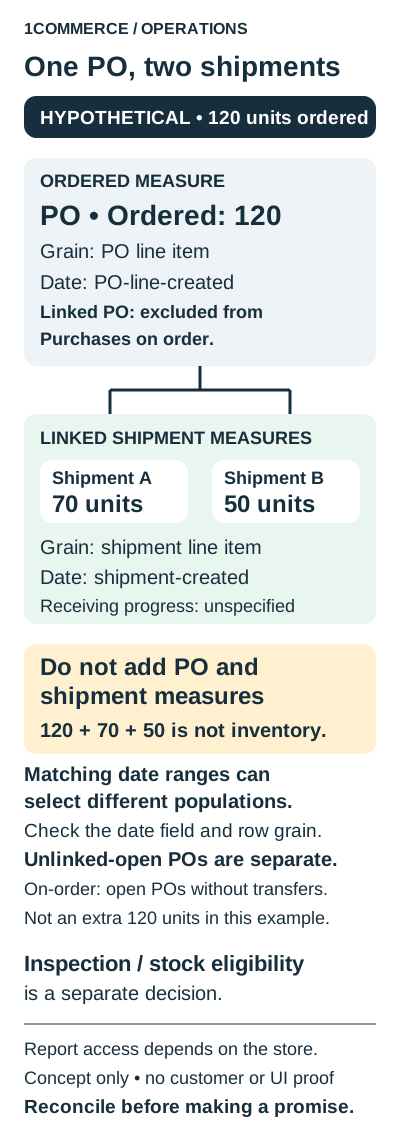
A hypothetical 120-unit order does not become 240 units
Suppose one fictional PO line orders 120 units of one item. It has two linked shipments: 70 units and 50 units. Receiving progress is unspecified.
| Hypothetical record | Quantity being described | Receiving progress |
|---|---|---|
| PO line | 120 ordered | Unspecified |
| Shipment A | 70 in this shipment | Unspecified |
| Shipment B | 50 in this shipment | Unspecified |
The calculation 120 + 70 + 50 = 240 mixes the order with its shipment breakdown. It is not an inventory total. In this example, the shipment quantities reconcile to the order, but nothing establishes how much has been received, inspected or made sellable.
This is a reasoning exercise, not a Shopify export, a demonstrated join or an observed merchant incident. Do not create a second 120-unit unlinked-open record for this linked example.
Check the date field before explaining a difference
Consider another hypothetical detail: the PO line was created on September 30, while its shipments were created on October 2 and October 4. An October date window applied to those different creation events can select different records. Identical date labels on two reports do not establish identical populations.
Record the event behind the filter before investigating a mismatch. Widening a window until totals agree is not a reconciliation method. The useful question is whether the selected records answer the same operational question.
Trace one PO with this checklist
Use a worksheet alongside whatever authorized records are available. These are proposed audit fields, not a promise that every export supplies them.
- Write the question. Are you checking what was ordered, what is linked to shipments or what receiving has established? Name the owner who will act on the answer.
- Identify each row. Record the report, grouping level, PO and PO-line key. For shipment records, capture the shipment and shipment-line key where available. If the link cannot be established, record an unresolved exception.
- Define the population. Note open/closed and linked/unlinked conditions. Mark whether a row is detail or a subtotal before considering any addition.
- Align scope. Record item, destination and unit of measure. Investigate incompatible units or locations separately.
- Name the date event. Write the field, range, timezone and extraction time. Flag records whose creation events fall on different sides of the reporting boundary.
- Keep measures separate. Give ordered, shipped and receiving quantities distinct columns. Leave missing evidence unknown; do not turn it into zero or an assumed receipt.
- Assign the exception. Record what is unresolved, who owns the evidence and which decision must wait. Require the business’s inspection and inventory rules to establish sellable eligibility.
What a buyer should ask for
Ask the person presenting an inbound number to trace one PO through its underlying records. A useful explanation should account for the population, row key and date field, then state what receiving evidence remains missing. A matching grand total alone is insufficient.
Start with one PO and retain the exceptions before extending the method. Once those measures are reconciled, use the existing available-to-promise inventory guide to work through the separate promise-policy decision.