Before you move acquisition budget because conversion rate changed, check whether the measurement changed too. A rate can move without proving that shoppers became more or less likely to buy.
Shopify announced a session measurement update beginning September 21, 2026. Its changelog says session-based metrics can change, while the update itself does not change total orders, sales or customer counts. That describes the scope of the update; it does not say a merchant’s business totals stayed flat. Shopify’s announcement is a reason to review your baseline before interpreting the next performance report.
Mark the definition boundary
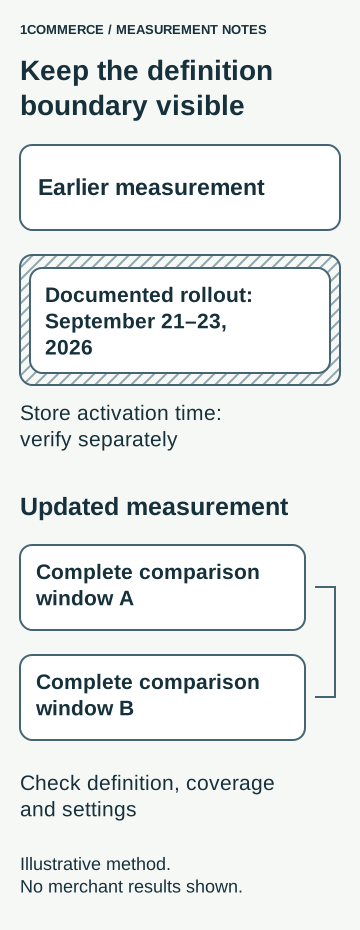
Shopify documents a September 21–23 rollout, not one activation timestamp for every store. Updated sessions follow continued activity across midnight UTC, include some journeys without a pageview and end after 30 minutes of inactivity. Identified bot sessions are excluded by default. Historical data is not reprocessed, although filtering can change its presentation. Bot classification starts October 7, 2025; matching filter settings does not make pre-update and post-update sessions directly comparable. See Shopify’s session measurement guide.
Put a visible boundary in your reporting notes. Record the documented rollout interval separately from any store-specific evidence you actually have. If the activation time is unknown, write “unknown.” A date printed in a vendor announcement is not proof of when a particular storefront changed.
Keep the earlier series for context. Start a separate baseline using complete periods confirmed to use the updated method. Do not splice the two into a continuous improvement story or use a correction factor to manufacture comparability.
Check coverage before comparing periods
A filter label is only part of the measurement contract. Shopify’s bot-filtering guidance explains that controls vary by reporting surface and storefront implementation, and classification can miss automated traffic. Filtering reports is also different from blocking crawlers. A report labeled human traffic is not proof that every session came from a person.
Ask the analytics owner to record four things before accepting a comparison:
- Surface: the exact report and storefront implementation, including any headless setup.
- Coverage: what the report includes, what is missing and any known collection interruption.
- Controls: the available filter and its value in each period; record unavailable controls explicitly.
- Window: start and end dates, report timezone and whether each period is complete.
If the team cannot establish coverage, label the baseline provisional. An unexplained gap should become an investigation with an owner, rather than a zero in the performance narrative.
Use a comparison card, not a blanket uplift claim
Our commerce KPI definitions guide explains how to document a metric. For this change, add a comparison card beside the weekly report. Its job is to decide which conclusions the team can support.
| Check | Record before the review | Decision it supports |
|---|---|---|
| Definition | Measurement version and evidence for the boundary | Whether the periods belong in the same baseline |
| Coverage | Missing intervals, excluded traffic and implementation limits | Whether the comparison is complete enough to use |
| Composition | Promotions, channel mix and weekday composition | Which alternative explanations need investigation |
| Business context | Orders and sales for the same dates, with their own definitions | Whether business activity also warrants a closer look |
| Ownership | Reviewer, unresolved question and next check | Who resolves uncertainty before the next decision |
Choose equal-length post-update periods with the same weekday composition once the definition and coverage checks pass. Keep promotions and changes in channel mix visible. Matching the calendar is a useful control, not a causal test.
Keep order totals alongside session metrics as context. Do not substitute orders for converted sessions or assume that a session change establishes a change in demand. Likewise, an unchanged order total cannot prove that every part of the shopper journey stayed the same.
A hypothetical review meeting
Imagine an ecommerce team preparing its October trading review. Its old comparison crosses the September rollout. The analytics owner has not established the store’s activation timestamp, and one proposed comparison week has a collection gap.
The team records two separate decisions. First, it retains the older chart with a measurement-boundary annotation and removes the proposed conversion-uplift conclusion. Second, it postpones the new baseline comparison until it has two complete post-update windows under consistent settings. It keeps reviewing orders and sales on their own terms while the collection gap is investigated.
This is an illustrative workflow, not a merchant case study or a claim that those checks will produce a particular result. The useful output is a narrower, defensible decision: what can be compared now, what cannot, and who owns the missing evidence.
Give the next report a clear owner
Before the next trading meeting, ask your analytics owner to complete one comparison card and annotate any chart that crosses the definition boundary. Have the commercial owner record whether the available evidence supports a budget decision or calls for further investigation.
If you are evaluating an analytics partner, ask them to walk through that card using your actual reporting scope. The buyer’s test is practical: can they explain the boundary, show the coverage limits and trace the conclusion? A dashboard alone cannot answer those questions.